
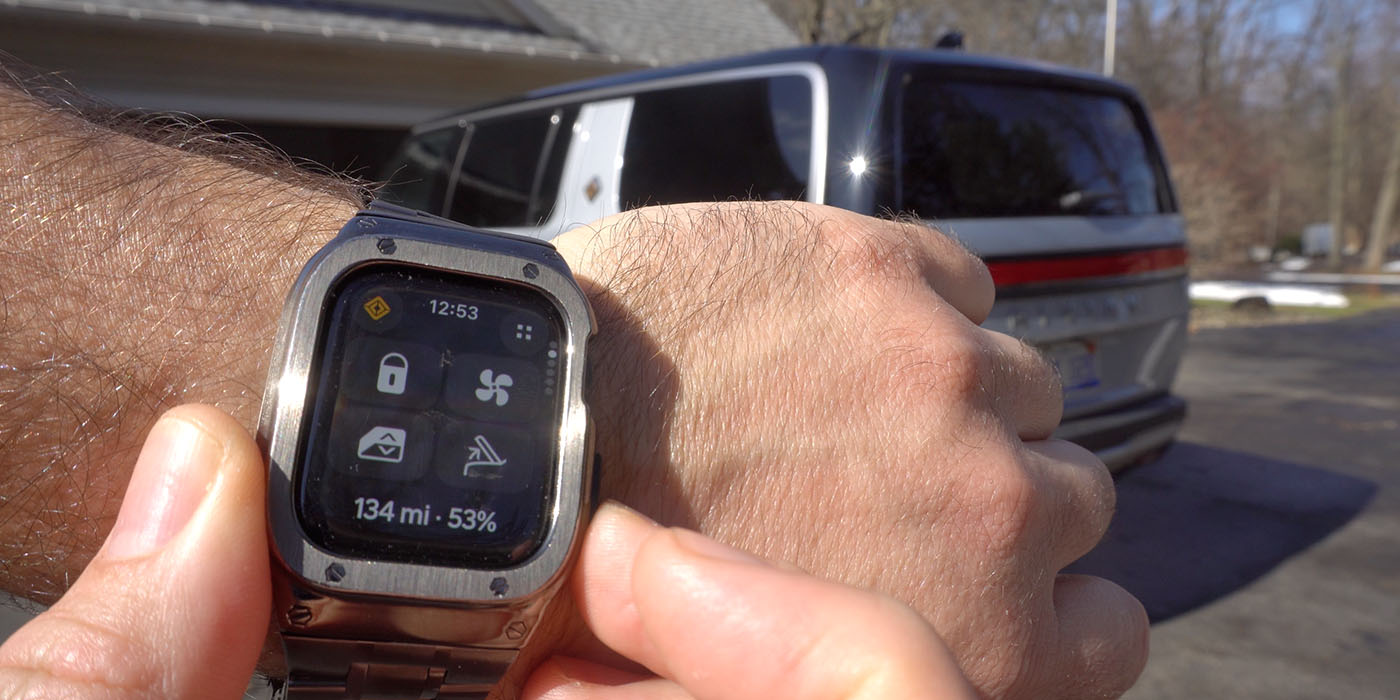
Three months after initial reports that Apple Watch support was coming to the Rivian app, the American automaker has begun rolling out the feature to its vehicle owners. I received early access to test on my R1S, which you can see in my video below.
Today’s rollout news dates back to mid-December 2025, when we shared details of Rivian’s OTA update, 2025.46. That software update included the addition of Universal Hands Free driving for Gen 2 R1 owners, as well as three new ADAS “Drive Styles,” enabling owners to “choose their autonomous spice-level.”
Lastly, details of software update 2025.46 included the addition of a new Digital Key feature, empowering Gen 2 owners to add their R1S or R1T key to their digital wallet on iPhone, Apple Watch, Google Pixel, or Samsung devices. Digital Key promises owners easier access to their EVs and the ability to share keys with family and friends.
Earlier this month, word began to spread that Rivian had developed a dedicated Apple Watch companion app. Per the report, Rivian’s Apple Watch app adds controls for venting windows, triggering the alarm, adjusting HVAC, or even setting a charge target.
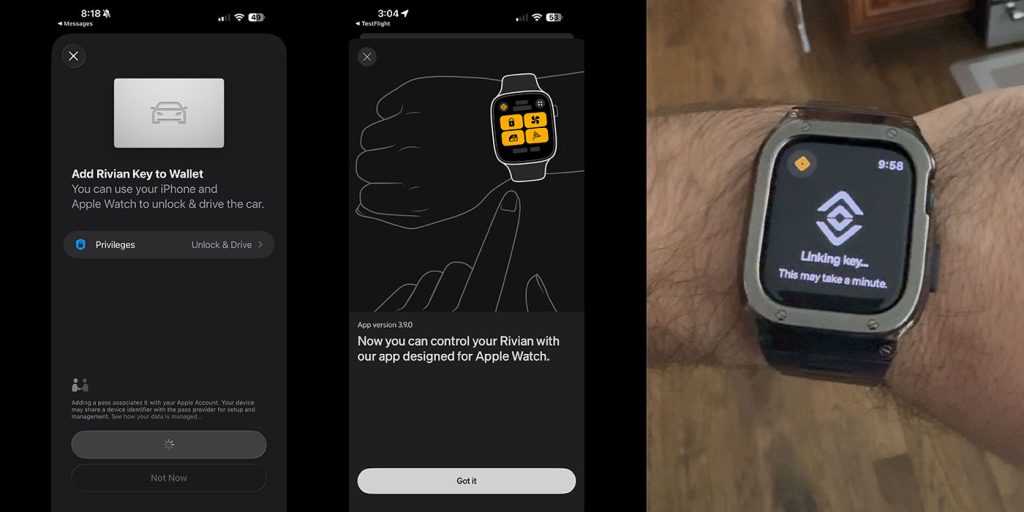
Furthermore, the new companion app gives Gen 1 R1S and R1T owners with an Apple Watch a digital car key for the first time. As a Rivian owner, I gained early access to Rivian app update 3.9.0, which included the ability to add Apple Watch access, which I documented below.
Rivian finally rolls out Apple Watch companion app
As promised, Rivian has officially launched its long-anticipated Apple Watch companion app, bringing wrist-based vehicle controls to R1 owners (including myself) for the first time. The Rivian app update follows a separate OTA software update, 2026.03, rolled out by Rivian this morning. More details on that update are available here.
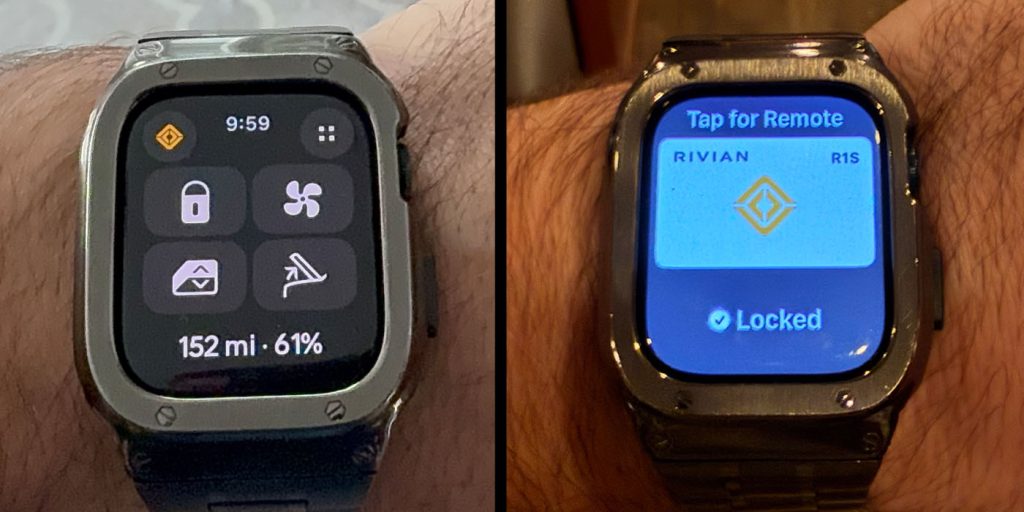
Rather than acting as a simple notification mirror, the app functions as a true companion — offering direct vehicle controls without requiring your iPhone to be in hand. With the new Apple Watch app, Rivian owners can:
- Lock or unlock doors, including hood and trunk
- Vent windows
- Trigger the alarm
- Activate and adjust cabin temperature
- Set a target state of charge
- Customize up to four quick-access controls
That last point is key. The interface isn’t static — R1S or R1T can personalize which four features appear as quick controls, tailoring the experience to their own daily habits. As you’ll see in my video below, the ability to set a charge target directly from the Digital Crown is a subtle but clever implementation. Instead of navigating through menus on a phone screen, you can scroll your wrist to dial in the exact percentage you want.
You can definitely still do that, but if you left your phone inside, for example, it’s nice to still have the option to control your vehicle’s temperature or charging limit from your wrist.
As I mentioned above, one of the most significant additions to this Apple Watch rollout is expanded Digital Key functionality for ALL Rivian EV owners. I had to set up the Digital Key again on my phone, but it seamlessly connected to my Apple Watch thereafter, enabling the passive entry I’ve become accustomed to with my iPhone… without the phone.
Rivian didn’t just shrink its phone UI to fit a smaller screen for Apple Watch users. The new app mirrors the visual language of the main Rivian app, creating a consistent design ecosystem that is easy to navigate and understand. Following the app update, Rivian owners can:
- Add glanceable battery status to their watch face
- See their specific vehicle color and configuration visualized
- Access Climate, Energy, and Gear Guard controls with familiar iconography
- Even spot the Gear Guard Yeti making an appearance on the tiny display (see my video below)
Battery range can now live alongside your daily activity rings — an integration that feels especially fitting for Rivian’s adventure-focused brand identity. I may not close my daily exercise ring, but at least I’ll be able to make sure my SUV is charged!
According to Rivian, this initial Apple Watch launch is only the beginning. The American automaker plans to continue evolving the app with additional features over time. We are not sure what that entails, but for right now, the additional access and core controls from your wrist are an excellent start.
From my early access experience with app version 3.9.0 on my R1S, the Apple Watch integration feels fast and genuinely useful rather than gimmicky. It’s not something you’ll use every single drive. Still, in the right situations — quick stops, outdoor adventures, or just forgetting your phone inside — it eliminates friction in a very Rivian way.
As promised, you can check out my complete walkthrough of the Apple Watch companion app and real-world demo with my Rivian R1S in the video below.


FTC: We use income earning auto affiliate links. More.



Comments