

Rivian has just shared details of its latest over-the-air software update 2025.46, which includes some of the new features announced during its recent AI and Autonomy event last week. The update features a new digital key function for Gen 2 R1 owners, “flavorful” drive styles, kick turns, tuning, and, of course, Rivian’s new Universal Hands-Free driving capabilities.
There’s a lot to unfold with the 2025.46 software update, so we’ll provide a quick recap of our visit to Rivian’s Palo Alto facilities last week for its inaugural AI and Autonomy Day. During the exclusive event, Rivian executives, like founder and CEO RJ Scaringe, unveiled the company’s new in-house designed silicon chip, which will help power its new dedicated autonomy platform.
In addition to adding LiDAR to the upcoming R2 models, Rivian shared plans to expand its Enhanced Highway Assist ADAS to support Universal Hands-Free driving. That includes expanded availability of the feature from 135,000 miles to over 3.5 million miles of roads across the US and Canada.
According to Rivian, this availability is expected to start rolling out in early 2026. However, it appears the process is now underway with its latest software update, which includes a slew of other noteworthy upgrades.

2025.46 includes Rivian’s Universal Hands-Free driving
According to a blog post from Rivian this morning, a key rollout in its end-of-the-year software update is Universal Hands-Free driving, which significantly expands the number of roads on which R1 owners can engage the driving assist feature.
With update 2025.46, Gen 2 drivers can engage Universal Hands-Free on virtually any road where lane lines are clearly marked. Note that this is not a full autonomy feature (yet), so Hand-Free cannot slow or stop at lights or stop signs.
Speaking of autonomy, Rivian is introducing three new Drive Styles for its assisted driving features, including Universal Hands-Free, Highway Assist, Adaptive Cruise Control, and Lane Change on Command. After the update, R1 owners will be able to choose their “spice level” of autonomous functions:
- Mild: A relaxed style with more gap distance and more gradual lane changes.
- Medium: A balanced style to manage cut-ins and accelerate with traffic flow.
- Spicy: A more dynamic style with a tighter gap distance and quicker steering during lane changes.
Another significant bonus, in addition to Universal Hands-Free, is Rivian’s new Digital Key feature for Gen 2 R1 owners. Following the 2025.46 update, owners will now be able to add their R1S or R1T key to their digital wallet on iPhone, Apple Watch, Google Pixel, or Samsung devices. Digital Key provides an additional means of easy access to your EV, as well as the ability to share keys with family and friends.
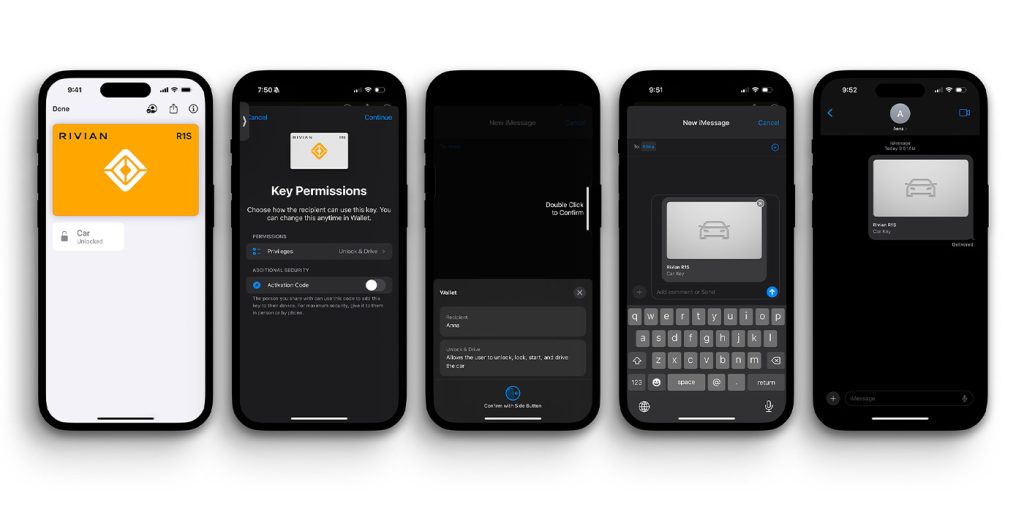
Other features in software update 2025.46 include a new way to view the Driver Display for both Gen 1 and Gen 2 R1 owners. Per Rivian:
Gen 2 drivers can now switch between the Autonomy view, which shows surrounding lanes and vehicles, and the Maps and Navigation view on the driver display. Gen 1 drivers can switch between the Driver Assistance view, which shows vehicles and objects up ahead, and the Maps and Navigation view on the driver display. Press the right thumbwheel on the steering wheel to swap.
Here’s an example:
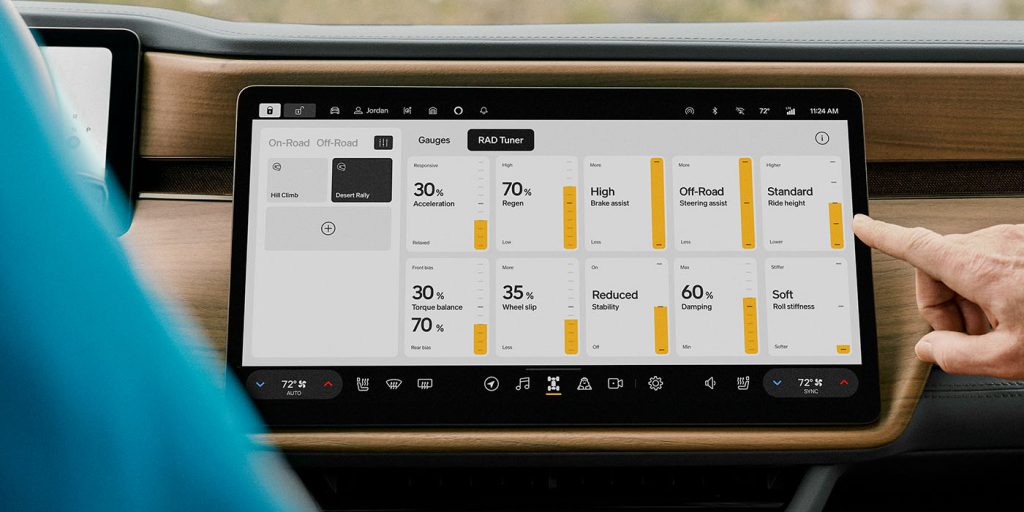
Last but not least, Rivian is introducing some exciting new features for R1 Quad owners. Software update 2025.46 includes a new tuner screen from the Rivian Adventure Department (RAD) – “a team of engineers, software developers, and designers who create and test features that push the boundaries of our vehicles.”
The RAD Tuner (seen below) was initially used by teams at Rebelle Rally and Pikes Peak, but is now available to Gen 2 Quad owners. Those drivers will be able to tune beyond Rivian’s factory presets and customize the vehicle’s behavior to their preferences and/or the terrain. Touch sliders control custom, savable drive modes that include factors such as acceleration, torque balance, and stability.
In addition to RAD Tuning, Rivian’s latest software update also includes the ability for Gen 2 Quad drivers to perform Kick Turns. Per the blog post:
Turn makes it easier to steer in tight off-road conditions while moving at speeds under 15 mph (24 km/h). It works by controlling the power and tire grip, letting the vehicle spin about its center, even when it’s moving. You can now make tighter turns with just a simple button press. When you engage Kick Turn, your R1 Quad smartly adjusts the power to the inside wheels, slowing them down or even reversing them. This precise control over wheel slip ensures your vehicle turns exactly as quickly and smoothly as you intend.
Electrek‘s Seth Weintraub tested it out in Lake Tahoe earlier this year, and it’s absolutely incredible. Check it out:
I have a Gen 2 R1S, so I’m looking forward to Universal Hands-Free rolling out so I can test it and report back. Stay tuned. If you haven’t test-driven a Rivian yet, I highly recommend doing so. You can schedule a demo drive at your nearest Rivian Space here.


FTC: We use income earning auto affiliate links. More.



Comments